• Skip to primary navigation
  • Skip to main content
  • Skip to footer
MOD MAJA Ojsteršek

MOD BOUTIQUE AGENCY

Websites and branding

  • 🚨 Simplify Your Business
  • FREE: The Client Flow Check
  • Client Machine
  • Free & premium courses
  • FREE: BRAND QUIZ
  • Brand & Website

Screen Options – WordPress tricks

15/02/2017

In previous posts I have mentioned … if you have the default setting in WordPress … and then the questions raised:
What if I do not have?
How can I view certain content?
How do I set back to the default view?
Eg. to see fields like an excerpt, choosing author …
 
In the upper right corner you can find the Screen Options and if you click it, you will see all available options:
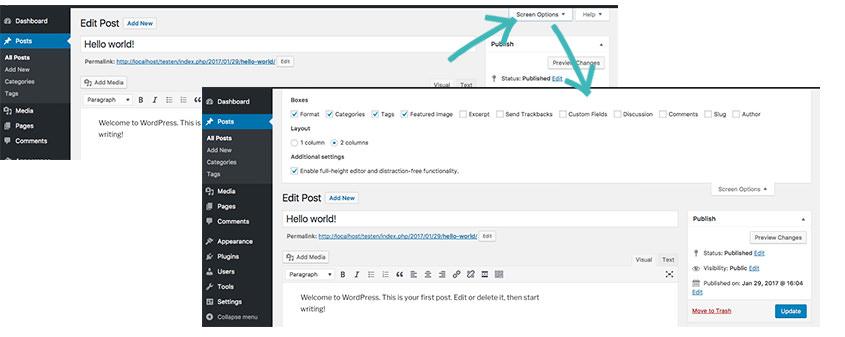


You can change Screen Option on all pages in WordPress, eg. you can hide unnecessary columns and make a list of all posts more relevant.

Posted Under: Quick & Simple Tips For WordPress Users

KAKO IZBRATI KLJUČNE
BESEDE
Free online course
How to Choose Keywords
START NOW

Reader Interactions

Morda te zanima tudi:

Related posts:

How to Protect a Page With Password
Copy-paste or duplicate content block
Hide or Show the Top Admin Bar on all Pages
Hide or Show the Top Admin Bar on all Pages – WordPress tip

Leave a Reply Cancel reply

Your email address will not be published. Required fields are marked *

Footer

MOD – BOUTIQUE AGENCY

Websites and branding

MOD – BOUTIQUE AGENCY

Want to make our planet better? But your recognition is minimal? Let’s create a brand and website that will automatically attract new customers!

  • Facebook
  • Instagram
  • Pinterest
  • YouTube

Want to get blog post notification? Subscribe to my newsletter!

Uporabne povezave

  • Portfolio
  • Online Courses
  • Hi, I’m Maja
  • Contact

Copyright © 2018–2026 MOD | Pogoji | Zasebnost
Copyright © 2018–2026 MOD | Terms | Privacy